

Key Takeaways
- QuickBooks for the UK self-employed is now sold as Sole Trader Plus at £10 + VAT a month and Simple Start at £16 + VAT a month, not as “QuickBooks Self-Employed”
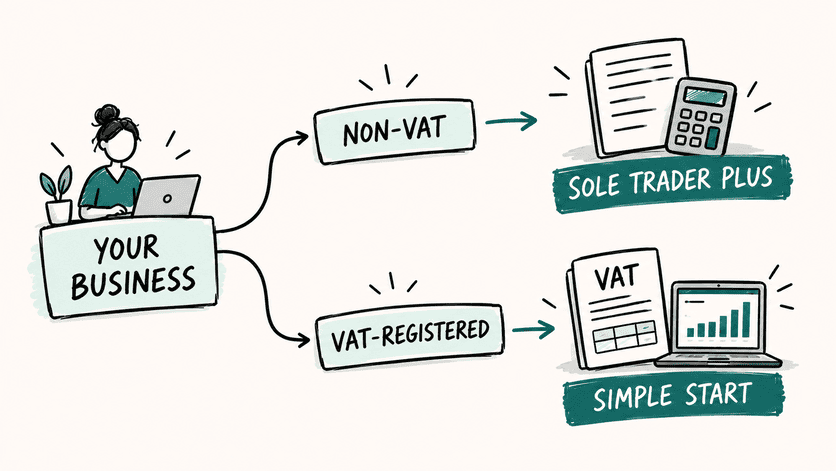
- Sole Trader Plus suits sole traders who are not VAT-registered, while VAT-registered business owners need Simple Start to submit VAT returns through the software
- A discount of up to 90% off for the first six months has been offered on these plans, but the full price returns once that window ends, so check the renewal rate before relying on the promo
- Payroll is always a separate add-on, starting at £5 a month plus £1.30 per paid employee for Core Payroll, and it can only be added from Simple Start upward, not on Sole Trader Plus
- Choosing the right accounting tier is one of several small structural decisions that keep a solo business steady, a theme explored in depth elsewhere
This article contains affiliate links. If you buy through them, Solo-Solvent may earn a small commission at no extra cost to you. It never affects the rankings.
Freelancers, consultants and one-person agencies spend their days juggling invoices, receipts and tax deadlines, so cloud accounting software often becomes the quiet engine behind the business. QuickBooks is one of the best-known names in that space, and UK readers searching for “QuickBooks Self-Employed” will actually land on products called QuickBooks Sole Trader Plus and QuickBooks Simple Start, since the original self-employed branding was discontinued in 2026.
Prices in the UK are almost always shown excluding 20% VAT, which catches out plenty of first-time buyers who budget off the headline number alone.
Working out which plan fits a solo service business, and what it really costs once VAT and any promotional offer wears off, matters more than it sounds. Small admin decisions, like picking the right software tier, are part of the same discipline that keeps pricing and cash flow under control for a self-employed service business.
Prices and introductory offers also change fairly often, so treat the figures below as a snapshot rather than a final word, and double-check the current rate before subscribing.
QuickBooks Self-Employed at a Glance
Two plans currently cover the self-employed market in the UK, and the right one depends mainly on VAT registration status.
- Sole Trader Plus: £10 + VAT per month, one user, accountant access included. Built for sole traders who are not registered for VAT and for single-property landlords. MTD for Income Tax ready. The main reason to upgrade from here is VAT registration or a need for double-entry accounting.
- Simple Start: £16 + VAT per month, one user, accountant access included. Built for self-employed business owners who need to manage both Income Tax and VAT. Handles MTD for VAT submissions, which Sole Trader Plus cannot do. The main reason to upgrade from here is needing payroll, multi-currency support, or custom invoice fields, which push a business toward higher tiers.
Both plans are billed monthly and VAT is added on top of the advertised price, so the figures above are not quite what appears on the final invoice
QuickBooks Self-Employed Pricing and Monthly Costs
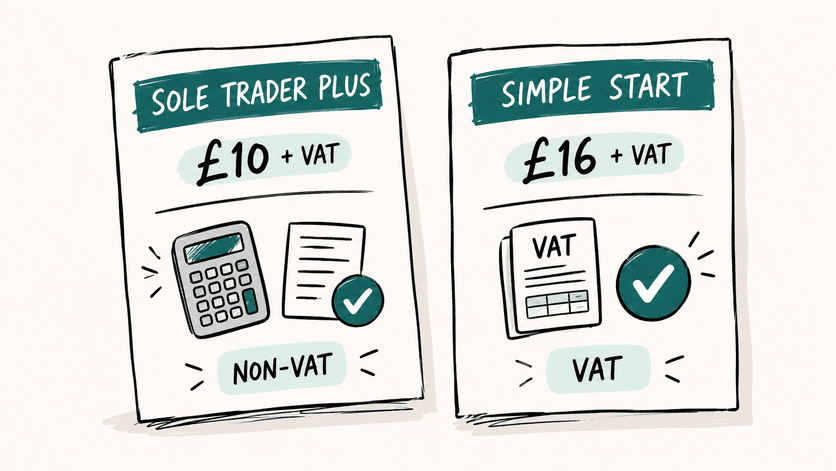
QuickBooks Sole Trader Plus pricing
Sole Trader Plus is priced at £10 a month before VAT. It supports a single user, though accountant access is included so a bookkeeper or accountant can be invited into the file without needing a separate login. This plan is specifically designed for sole traders who are not VAT-registered, along with landlords who manage one rental property, rather than anyone with more complex VAT or payroll needs.
Promotional pricing is common on this tier, and discounts of up to 90% off for the first six months have been seen on the Sole Trader Plus plan. Once that introductory period ends, the subscription reverts to the standard £10 + VAT monthly rate, so it is worth marking a reminder in the calendar to check the next invoice rather than being caught off guard.
QuickBooks Simple Start pricing
Simple Start costs £16 a month before VAT. Unlike Sole Trader Plus, this plan includes full VAT functionality, meaning it can prepare and submit VAT returns directly to HMRC and flag discrepancies between profit and loss figures and VAT reports. Accountant access is also included on this tier, keeping collaboration straightforward for anyone who outsources part of their bookkeeping.
Payroll is not bundled into Simple Start. It sits as a separate add-on from this plan upward, a point covered in more detail further down this piece.
What VAT and promotional discounts do to the real cost
A promotional price can look tempting, but it rarely reflects what gets charged a few months down the line. A handful of points are worth keeping in mind before committing a card number:
- Advertised prices generally exclude VAT, so the real monthly cost is always higher than the headline figure once the standard rate is applied.
- Discounts, such as the reduction of up to 90% sometimes offered for the first six months, apply only for that limited window before reverting to the standard rate.
- The subscription cost after any promotion ends should be checked directly against the current published rate, since this is the number that matters for ongoing budgeting.
- Payment-processing fees for accepting card or bank transfer payments through invoices, along with payroll charges, sit outside the base subscription and add to the real monthly spend.
- Whether a plan renews monthly or annually affects how quickly a price change takes effect, so it is worth confirming the billing cycle before signing up.
Sole Trader Plus vs Simple Start feature table
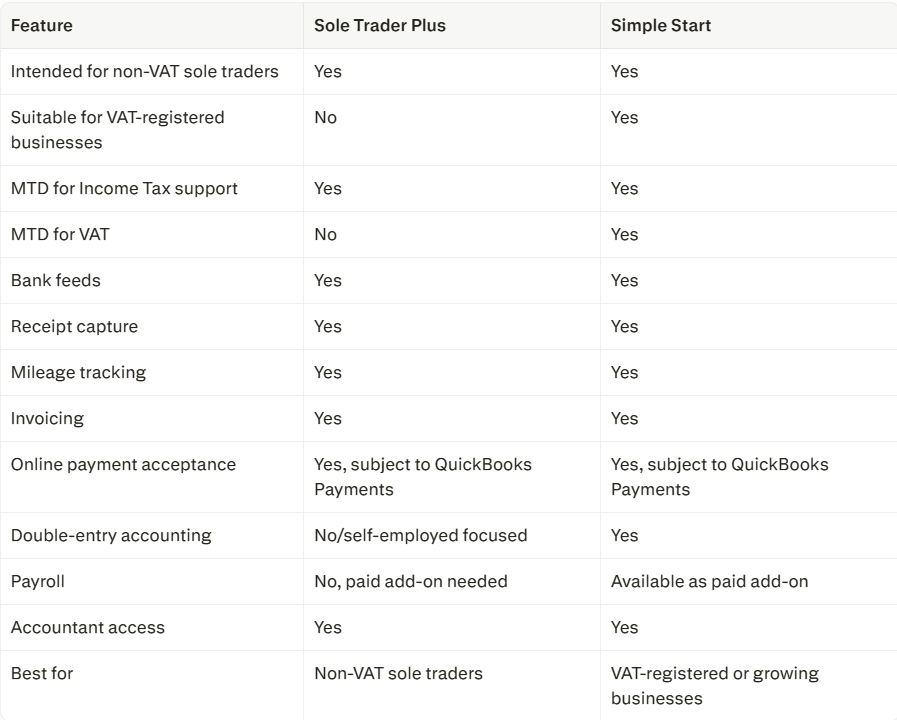
AI Tools, Mobile Features and Making Tax Digital readiness
Automated expense categorisation
Every plan comes with AI-powered bank feeds that suggest categories for transactions and help separate business spending from personal spending. This can genuinely cut down on the tedious side of bookkeeping, particularly for anyone who finds manual data entry draining. The categorisation still needs a human check, though, since the AI relies on the clarity of the connected bank feed and can misjudge an unusual transaction.
Mobile app availability and limitations
Solo service businesses rarely sit at a desk all day, so a capable mobile app matters as much as the desktop version. The QuickBooks mobile app allows receipt capture by photographing a paper receipt on the go, automatic mileage tracking using the phone’s GPS to log business journeys, and invoice creation and sending without needing a laptop nearby. Bank transactions can also be reviewed and categorised from the app.
Not every desktop feature carries over to mobile in exactly the same way, particularly around more detailed reporting, so anyone relying heavily on the app for in-depth financial analysis may still want to check figures on a larger screen from time to time.

HMRC-recognised software and submissions
Being MTD-compatible, preparing records for a return, and actually submitting that return to HMRC are three separate things, and it helps to know which one applies to a given plan. Simple Start is described by Intuit as supporting MTD for VAT and MTD for Income Tax submission checks, meaning it can prepare figures and flag errors before anything is sent off. Sole Trader Plus is MTD for Income Tax ready but does not offer VAT submission, so anyone who becomes VAT-registered will need to move up to Simple Start to file VAT returns directly through the software.
It is also worth remembering that signing up for MTD for Income Tax Self Assessment has to happen directly with HMRC before any software, including QuickBooks, is authorised to handle submissions on a user’s behalf.
Snap receipts and track mileage
For a freelancer or consultant juggling several clients, a stack of paper receipts and a notebook of mileage can quietly become one of the most time-consuming parts of running the business. Snapping a receipt with the phone’s camera creates a digital record that supports expense claims, while automatic mileage tracking helps log business journeys without manual note-taking after every trip. Each entry should still be checked to confirm the trip or expense is genuinely business-related and tax-deductible, since software can log a trip or purchase but cannot judge its purpose.
Discounts, Free Trials and Payroll Add-Ons
Current promotions and free trials
QuickBooks does not offer a permanent free plan, but it does run a 30-day free trial. That free trial cannot be combined with the discount of up to 90% sometimes offered for the first six months, so a choice has to be made between trying the software for free first or locking in the cheaper introductory rate straight away. Both the trial and the discount are typically aimed at new customers rather than existing subscribers, and the reduced rate has applied across the main self-employed plans rather than being limited to just one tier. Once the trial or discount period ends, pricing returns to the standard monthly rate for whichever plan was chosen.
Why Payroll Costs Extra
Payroll sits outside the core subscription on every plan, which is fairly standard across accounting software rather than something unique to QuickBooks. Core Payroll costs £5 per month plus £1.30 per paid employee per month, while Advanced Payroll costs £8 per month plus £1.30 per paid employee per month. Payroll can only be added from Simple Start upward; it is not available as an add-on for Sole Trader Plus. Most solo service providers without staff will never need this add-on, but anyone who takes on even a single part-time employee should budget for it separately from the base subscription.
Other possible extra costs
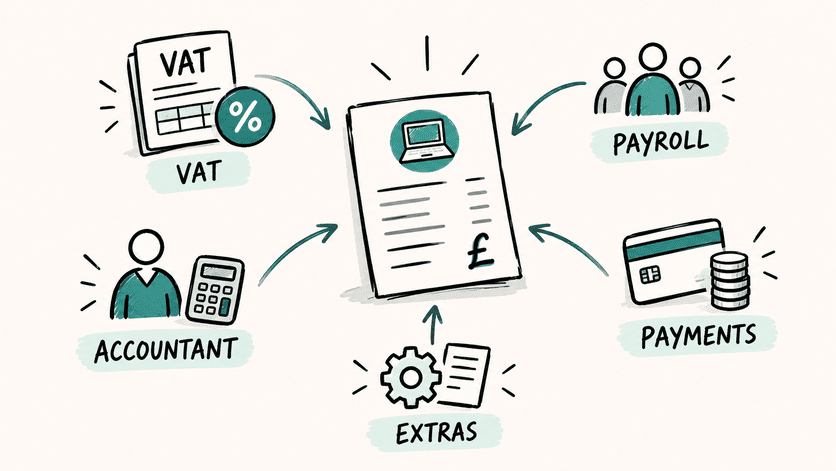
A subscription price rarely tells the whole story, so it helps to map out everything that could land on a monthly bill before choosing a plan:
- QuickBooks Payments transaction fees, charged when clients pay invoices by card or bank transfer through the platform.
- Payroll add-on fees, as outlined above, for anyone employing staff.
- Accountant fees, which sit entirely outside the software cost even though the software can make an accountant’s job faster.
- Bank-feed or payment-provider limitations that might restrict which accounts connect automatically.
- Any separate tax-filing service, since bookkeeping software prepares figures but a separate submission process may still involve a paid service depending on the setup.
- Professional help, whether design, copywriting or technical support.
- VAT, added at the standard rate on top of every advertised subscription price.
Choosing the Right Plan for Your Business
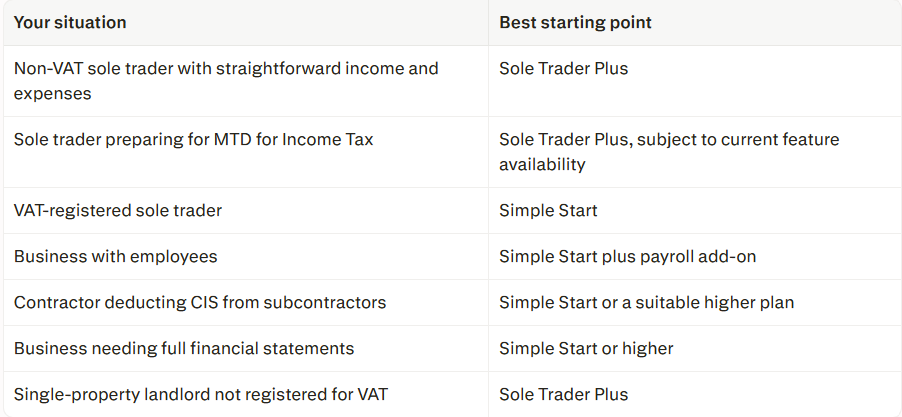
Working out which plan fits comes down to a few honest questions. Anyone not registered for VAT, without employees, and simply needing to track income, expenses and mileage for a Self Assessment return will likely find Sole Trader Plus covers the basics well. Anyone VAT-registered, or expecting to cross the VAT threshold soon, will need Simple Start to actually submit VAT returns through the software rather than juggling a separate system. Those who take on staff, need multiple currencies, or want custom invoice fields will eventually look past both these plans toward higher tiers built for growing limited companies.
Because Intuit can rename plans, move features between tiers or adjust pricing without much notice, it is worth checking the latest QuickBooks feature comparison directly before making a final decision, rather than relying solely on any single piece of writing.
Getting the plan right from the start saves the hassle of migrating data later. But software only shows where the money went. It won’t tell you where the pressure in your business is building. If you want a quick, honest read on that, take The Solo Business Pressure Test. It takes a few minutes and shows which part of your business needs attention first.