
Key Takeaways
- Calendly, Acuity Scheduling, Zoho Bookings, Square Appointments and Salesforce each suit a different kind of solo booking workflow, so the right pick depends on how clients actually book rather than which tool has the longest feature list
- Automated reminders have been shown to lift attendance from 67.8% to 78.6%, making them one of the highest-value features a solo provider can switch on
- More than half of customers now prefer self-service booking for simple tasks, which explains why 24/7 booking portals have become a baseline expectation rather than a nice extra
- Scheduling tools that connect to payments and CRM data reduce admin work and help a solo business keep a unified view of every client relationship
- Treating scheduling as a structural fix for pressure-driven decisions, rather than just a convenience upgrade, pays off for solo owners over time
- Booking a single appointment by email can take a surprising number of messages back and forth before both sides land on a time. For a solo service provider juggling client work, admin and everything else on their plate, that kind of friction adds up fast. This piece compares the scheduling tools best suited to different solo workflows, so the choice comes down to fit rather than guesswork.
Reminders Lift Attendance to 78.6%
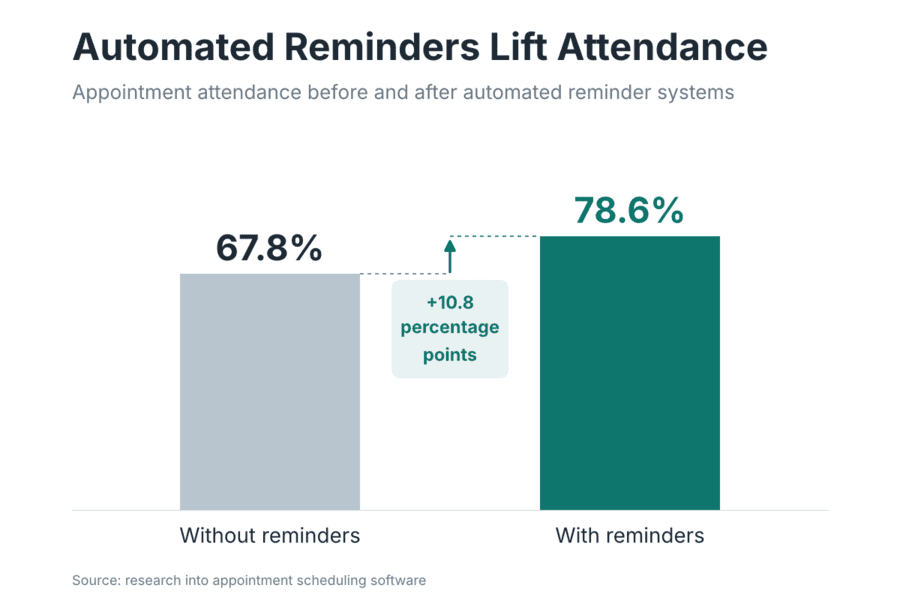
One of the highest-impact features in any scheduling tool is the automated reminder. Research into appointment scheduling software found that reminder systems improved attendance from 67.8% up to 78.6%, a meaningful jump for any solo provider who feels the sting of a no-show. A missed session does not just cost the hour itself; it costs the admin time spent booking it, the preparation that went into it, and often the chance to fill that slot with someone else.
Reminders work because they solve a very human problem: people forget things, especially when a booking was made weeks in advance. An email the day before or a text an hour ahead closes that gap without any extra effort from the provider. For a one-person business where every hour is accounted for, this single feature can justify the switch from a manual calendar to proper scheduling software.
Why Solo Owners Need Smarter Scheduling
Manual booking feels manageable until the diary fills up. Then it quietly becomes one of the biggest drains on a solo provider’s week, eating into time that should go toward client work or rest.
The Hidden Cost of Manual Booking
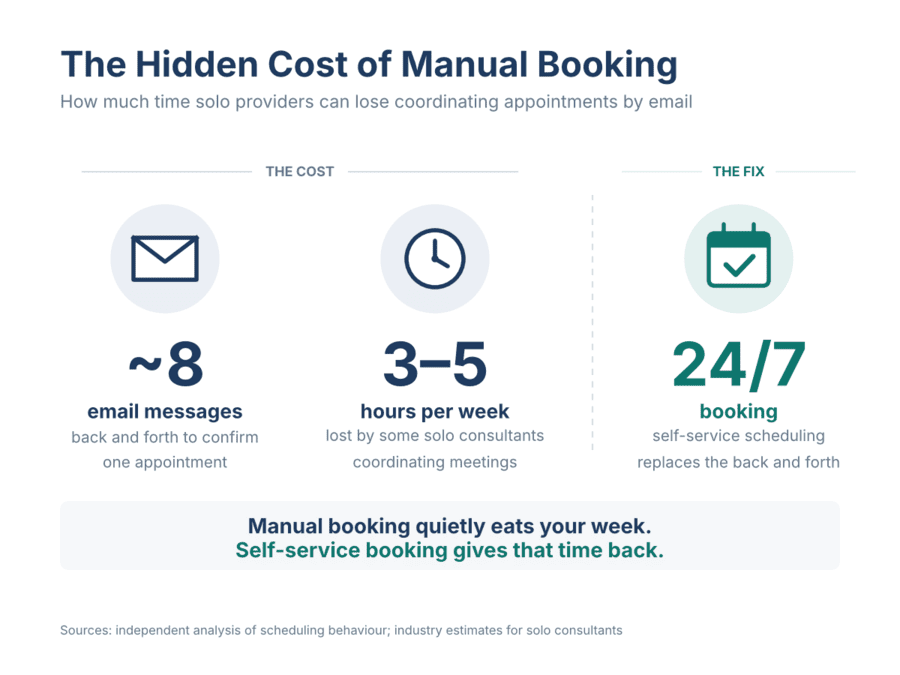
Coordinating a single meeting by email typically takes around eight messages before a time is confirmed, according to independent analysis of scheduling behaviour. Multiply that across a full client list and the hours disappear quickly; some estimates put the weekly loss for solo consultants at three to five hours spent purely on coordinating meetings. That time could go toward billable work, marketing, or simply switching off at the end of the day. Scheduling software removes most of this friction by letting clients see live availability and book directly, without a single email exchange.
There is also a quieter cost: double bookings, missed calendar updates and the awkward conversations that follow. A scheduling tool that automates the process saves time otherwise spent on spreadsheets and calls, while giving a real-time view of availability that prevents conflicts and overbooking. For a solo provider without a team to catch mistakes, that built-in safety net matters more than it might for a larger business.
Self-Service Demand in the State of Service Report
Client expectations have shifted. Salesforce’s State of Service Report found that 61% of customers prefer to use self-service for simple issues rather than waiting on a call or an email reply. Booking an appointment falls squarely into that category for most clients: they would rather pick a slot from a calendar at ten at night than wait for a reply the next morning.
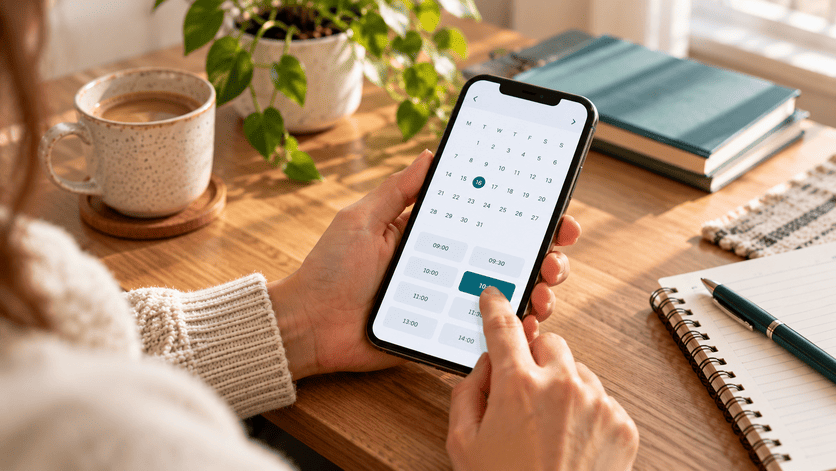
This preference works in a solo provider’s favour. A self-service portal lets clients book outside office hours, which can mean capturing an enquiry the moment someone decides to commit rather than losing momentum while they wait for a response. It also frees the provider from being the bottleneck in every single booking, which becomes increasingly valuable as a client list grows.
Features That Actually Matter
Scheduling tools vary widely in sophistication, but a handful of features consistently separate the useful ones from the merely decorative.
Calendar Sync and Automated Reminders
Two-way calendar sync with Google, Outlook or iCal is the foundation of any decent scheduling tool. Without it, availability has to be checked and updated manually, reintroducing the exact problem scheduling software is meant to solve. Paired with automated reminders sent by email or SMS, calendar sync keeps a diary accurate and clients informed without any extra typing.
Self-Service Booking Portals
A booking portal does more than look modern on a website. It lets customers book themselves 24/7 and receive automatic reminders, cutting out back-and-forth communication that eats into a solo provider’s day. The best portals also allow service-specific rules, such as different durations, prices or buffers between sessions, so a quick call and a full consultation are not treated the same way in the calendar.
Payment and CRM Integration
Collecting payment at the point of booking does two useful things at once: it reduces last-minute cancellations, since a client who has already paid is far less likely to skip the session, and it removes a separate invoicing step from the to-do list. Many scheduling tools now connect directly with payment gateways such as Stripe, PayPal or Square, allowing card payments, mobile wallets and bank transfers without leaving the booking flow.
Integrating scheduling with CRM data goes a step further. It gives a single, up-to-date view of every client interaction, which makes each person feel remembered rather than processed. This kind of operational tidiness is one of the quiet structural fixes that separate a business able to absorb a bad month from one that cannot, since clean systems reduce the number of small decisions a solo owner has to make under pressure.
Matching Tools to Your Workflow
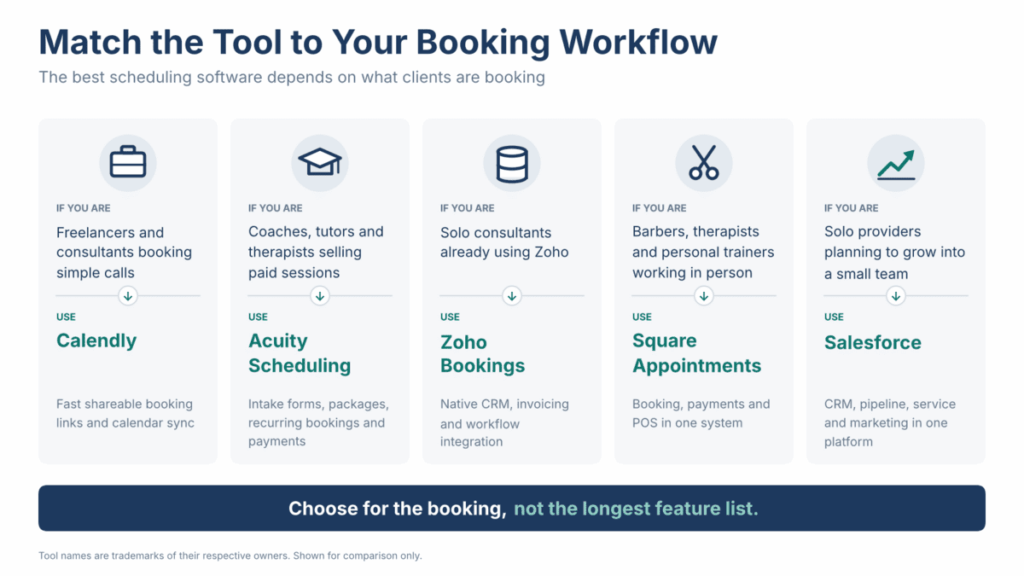
No single scheduling tool suits every solo business, because the booking itself varies so much from one service to another. The best approach starts with what a client is actually booking, then works backwards to the tool built for that job.
Calendly for Simple Client Calls
Calendly suits freelancers, consultants and solo providers whose main need is letting clients book a call without endless email exchanges. A shareable link shows available times, clients pick one, and the booking syncs automatically with Google Calendar and video tools like Zoom. Calendly’s free plan includes one event type and one calendar connection, while paid plans start at $10 per user per month and add team scheduling, workflows and deeper integrations. It works best for discovery calls, sales conversations and straightforward one-to-one meetings rather than complex, paid service bookings.
Acuity for Service-Based Businesses
Acuity Scheduling is built for providers whose appointment is the product itself, such as coaches, tutors, therapists and consultants running structured sessions. It handles customisable intake forms, packages, memberships and recurring appointments far more comfortably than a simple link-sharing tool. Reminders go out automatically by email, with text reminders available on higher-tier plans, and payments can be collected through PayPal or Stripe at the time of booking. Its Starter plan runs $20 per month when billed monthly, with a higher tier priced at $34 per month for added features. It suits anyone whose bookings involve more complexity than a single fixed-length call.
Zoho Bookings for CRM-Led Workflows
Zoho Bookings makes the most sense for solo consultants or small agencies already working inside Zoho CRM or other Zoho applications. Its native integration means bookings, invoicing, workflows and custom forms all connect without manual data entry, which keeps client records consistent across every touchpoint. For a solo provider who has already invested in Zoho’s ecosystem, this tight integration can outweigh the appeal of a standalone scheduler with a longer feature list.
Square Appointments for In-Person Providers
Square Appointments is the natural choice for solo providers who work face-to-face and take payment on the spot, such as barbers, massage therapists or personal trainers. It combines scheduling with Square’s payment system and point-of-sale tools, so bookings and payments sit on a single platform rather than two. A free plan is available for a single location, with the Plus plan priced at $49 per month per location and a Premium plan at $149 per month per location as more features or staff are added.
Salesforce for Solo Providers Planning to Grow
Salesforce is a different kind of tool from the other four. It’s a full CRM first, with sales, service and marketing tools in one place, and booking is only one part of that. It suits a solo consultant or agency owner who expects to hire within the next year or two, and wants client records, sales pipelines and follow ups to live in one system from day one.
The trade-off is that scheduling isn’t its strongest feature out of the box. Salesforce does sell a dedicated scheduling add-on, but it’s built for larger teams and is priced on top of the main subscription. Most solo users either pair Salesforce with a simpler booking tool, such as Calendly, or start with the basic booking features in the entry plan. The Starter Suite costs $25 per user per month and can be paid month to month, with a 30 day free trial. The Pro Suite costs $100 per user per month, billed annually. For someone who only needs a booking link, that’s a lot of system to pay for. For someone building towards a small team, it can save a painful switch later.
What Scheduling Tools Cost
Pricing varies considerably depending on how much complexity a solo provider needs. Calendly’s paid plans start at $10 per user per month on top of its free tier, while Acuity Scheduling’s Starter plan costs $20 per month when billed monthly, rising to $34 per month on its next tier. Zoho Bookings has a free plan for one user, with its Basic plan at $8 per user per month billed monthly, or $6 billed annually. Its Premium plan costs $12 per user per month, or $9 billed annually, and it’s the plan that connects to Zoho CRM. Square Appointments provides a free plan for a single location, with its Plus tier priced at $49 per month per location and Premium at $149 per month per location. Salesforce starts at $25 per user per month, but it costs the most once you move past its entry plan, because you’re paying for a full CRM rather than just a booking tool.
The spread in pricing makes it worth testing before committing. Most of these tools offer a free plan or trial precisely so a solo provider can book a few test appointments, check how confirmation emails look, and confirm the booking page matches their brand before paying anything.
Scheduling Software Should Scale With You
A tool that works well for ten clients a month can start to creak at fifty, particularly once multiple services, staff, or more complex workflows enter the picture. Good scheduling software adapts as a business expands, handling more clients and more complicated booking rules without forcing a painful switch to a different platform later. This matters more for a solo provider than it might seem at first glance, because migrating booking history, client data and payment setups mid-growth is exactly the kind of admin burden scheduling tools are meant to eliminate.
Choosing with growth in mind does not mean picking the most expensive option from day one. It means checking whether a free plan’s limits, such as a single event type or one calendar connection, will become a problem within the next year, and whether upgrading paths exist without starting from scratch. A tool that can grow from a single calendar link into a fuller booking and payment system saves a repeat decision down the line.
The Right Fit Beats the Most Features
The temptation when comparing scheduling tools is to chase the longest feature list, but the smarter approach starts with the booking itself. A quick client call, a paid coaching session, an in person treatment, a CRM led consultation and a sales call in a growing business each call for a different kind of tool, and matching the software to that real workflow eliminates far more admin than picking whatever has the most integrations listed on its homepage.
Reminders, self-service portals, payment collection and CRM integration all solve genuine pain points for a solo provider, but only when they match how clients actually book.
A booking tool fixes one leak. Most solo businesses have more than one. The no show. The late invoice. The lead who went cold because the reply came too slowly. Each one feels small on its own. Together they push you into decisions you make under pressure.
I built The Solo Business Pressure Test to show you where that pressure is coming from. It’s free. Take the Pressure Test
Already know your real problem is getting the right clients booked in? That’s what The Client Engine is for. See how The Client Engine works
